
Your Shop's Khata & POS — Right on Your Phone. آپ کی دکان کا حساب، کھاتہ اور سیل — اب موبائل پر پکا۔
This manual provides a complete visual guide for shopkeepers, salesmen, and field agents. Learn how to record customer udhaar, speak into your phone to update your hisaab, scan barcodes with your camera, bill customers, and print thermal slips on Bluetooth printers. یہ یوزر مینوئل دکانداروں، سیلز مین اور نمائندوں کے لیے مکمل تصویری گائیڈ ہے۔ موبائل ایپ سے ادھار کا حساب رکھنا، بول کر کھاتہ درج کرنا، کیمرے سے بارکوڈ سکین کرنا، بل کاٹنا اور بلیوٹوتھ پرنٹر سے رسید نکالنا سیکھیں۔
1 What is PakkaHisaab Mobile? پکا حساب موبائل کیا ہے؟
PakkaHisaab Mobile turns any Android smartphone or iPhone into a full digital counter, khata register, barcode scanner, and wireless receipt terminal. Perfect for Pakistani mobile shops, general stores, garments, hardware, and wholesale distributors. پکا حساب موبائل آپ کے سمارٹ فون کو مکمل ڈیجیٹل کاؤنٹر، ادھار رجسٹر، بارکوڈ سکینر اور وائرلیس رسید مشین بنا دیتا ہے۔ پاکستانی موبائل دکانوں، جنرل اسٹور، کپڑوں، ہارڈویئر اور ہول سیل کاروبار کے لیے بہترین حل۔
Unlimited customer udhaar, payment recovery, voice ledger entries, and WhatsApp reminder slips.لامحدود گاہک کھاتہ، ادھار وصولی، بول کر اندراج اور واٹس ایپ پر یاد دہانی کے پیغامات۔
Say "Ahmed ko 5000 udhar diya" in Urdu or English — the app automatically parses and writes the ledger entry.بس بولیں "احمد کو 5000 ادھار دیا" — ایپ خود بخود نام اور رقم پہچان کر کھاتے میں لکھ دے گی۔
Use your phone's camera to scan barcodes and mobile IMEIs instantly without buying expensive hardware scanners.بغیر کسی مہنگے سکینر کے اپنے موبائل کیمرے سے بارکوڈ اور موبائل IMEI چند سیکنڈ میں سکین کریں۔
Connect to affordable 58mm / 80mm wireless pocket printers. Print customer receipts on the spot.سستے وائرلیس پاکٹ پرنٹر (58 یا 80 ملی میٹر) سے جوڑیں اور فوراً کسٹمر کو پکی رسید نکال کر دیں۔
2 Install & Login to Your Shop انسٹالیشن اور دکان کا لاگ اِن
Getting started takes less than 60 seconds. New users can create a free account, while existing web app users can log in with their same phone number or email. ایپ شروع کرنا 1 منٹ سے بھی کم وقت لیتا ہے۔ نئے دکاندار مفت اکاؤنٹ بنا سکتے ہیں اور پرانے صارفین اپنے فون یا ای میل سے لاگ اِن کر سکتے ہیں۔
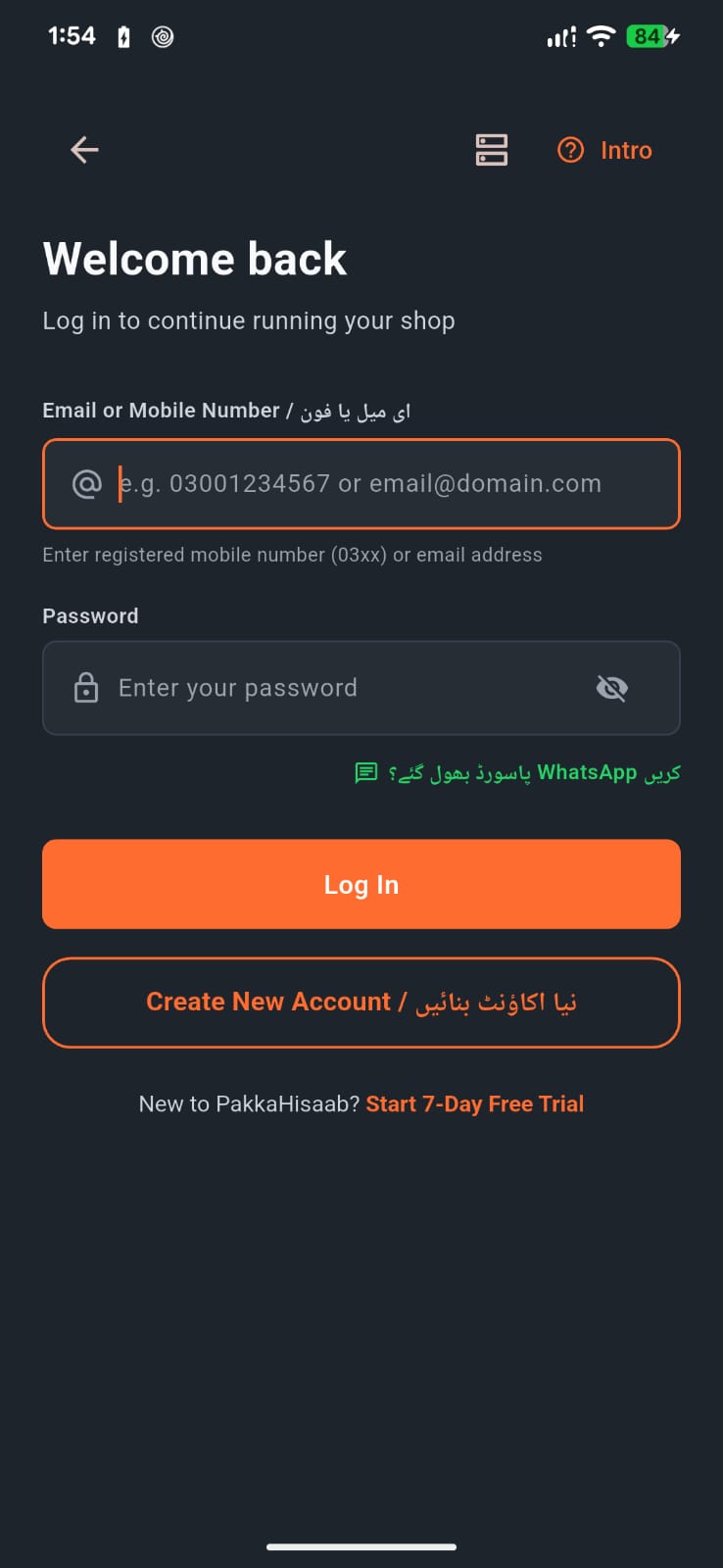
Fast & Secure Mobile Login تیز اور محفوظ لاگ اِن
- Open the app and choose your language: English or اردو. ایپ کھولیں اور اپنی پسندیدہ زبان منتخب کریں: اردو یا English۔
-
Enter your registered Email Address OR Mobile Number (e.g.
demo@khatapro.pkor0300 1234567). اپنا رجسٹرڈ ای میل ایڈریس یا موبائل نمبر درج کریں (دونوں آپشنز کے ذریعے لاگ اِن ممکن ہے)۔ - Enter your account password. اپنا پاس ورڈ درج کریں۔
- Tap Log In to load your shop data instantly. لاگ اِن کریں پر کلک کریں، آپ کی دکان کا ڈیٹا فوراً لوڈ ہو جائے گا۔
3 Mobile Dashboard — Shop Health at a Glance موبائل ڈیش بورڈ — ایک نظر میں دکان کی صورتحال
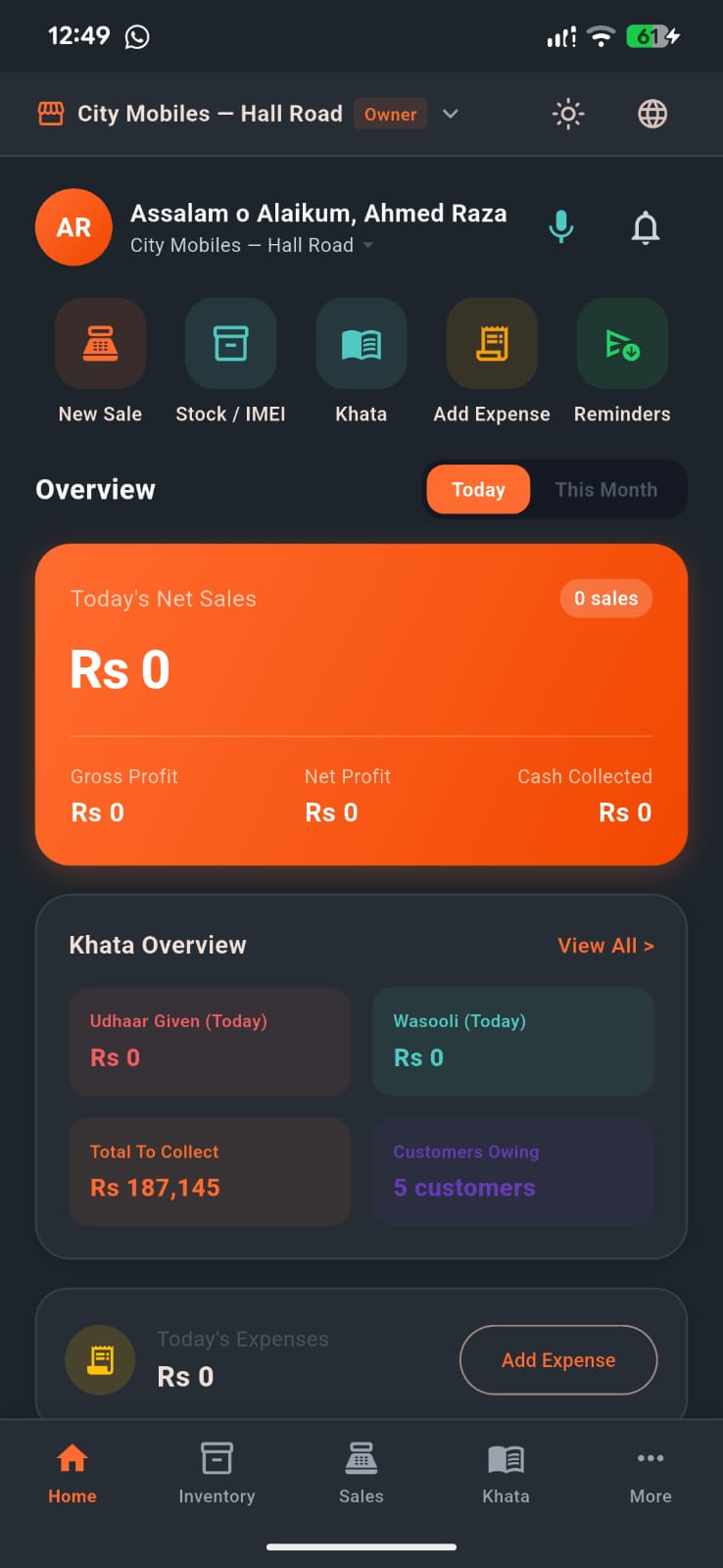
The command center of your shop. Track today's cash drawer, pending udhaar recoveries, real net profit, and recent customer activity without opening heavy balance sheets. آپ کی دکان کا کنٹرول روم۔ کیش کاؤنٹر، واجب الوصول ادھار، خالص منافع اور حالیہ سرگرمیاں بغیر کسی کاغذی کھاتے کے فوری دیکھیں۔
Real-Time Business KPI Cards کاروبار کے اہم نمبرات ایک نظر میں
The top bar shows your active shop (e.g. "City Mobiles — Hall Road") and your role ("Owner"). Tap to switch between multiple branches if you operate more than one store. اوپر آپ کی دکان کا نام (مثلاً "سٹی موبائلز — ہال روڈ") اور آپ کا رول نظر آتا ہے۔ اگر آپ کی ایک سے زیادہ دکانیں ہیں تو باآسانی دوسری برانچ میں جا سکتے ہیں۔
- Today's Net Sales: Total retail revenue, invoice count, gross profit, and cash collected.آج کی نیٹ سیل: کُل فروخت، بلوں کی تعداد، مجموعی منافع اور کیش وصولی۔
- Net Profit: Real profit after subtracting product purchase costs and shop expenses.خالص منافع: مال کی خرید اور اخراجات نکالنے کے بعد اصل کمائی۔
- Khata Overview: Live snapshot of Udhaar Given today, Wasooli collected, and Total To Collect across all customers.کھاتہ جائزہ: آج دیا گیا ادھار، آج کی وصولی، اور مارکیٹ سے کُل واجب الوصول رقم۔
- Quick Actions: One-tap access to New Sale, Stock/IMEI, Khata, Add Expense, and WhatsApp Reminders.فوری کام: ایک کلک پر نیا بل، سٹاک/IMEI، کھاتہ، خرچہ اور واٹس ایپ یاددہانی۔
4 Customer Khata — Digital Udhaar Register گاہک کا کھاتہ — ڈیجیٹل ادھار رجسٹر 100% Free Foreverہمیشہ مفت
Say goodbye to old, torn paper registers. Manage all customer balances, search by phone number or name, and track clear running balance statements with red (udhaar) and green (payments) badges. پرانے، پھٹے ہوئے کاغذی رجسٹروں کو خیرباد کہیں۔ ہر گاہک کا حساب محفوظ رکھیں، نام یا فون نمبر سے تلاش کریں اور سرخ (ادھار) اور سبز (وصولی) سے واضح ہسٹری دیکھیں۔
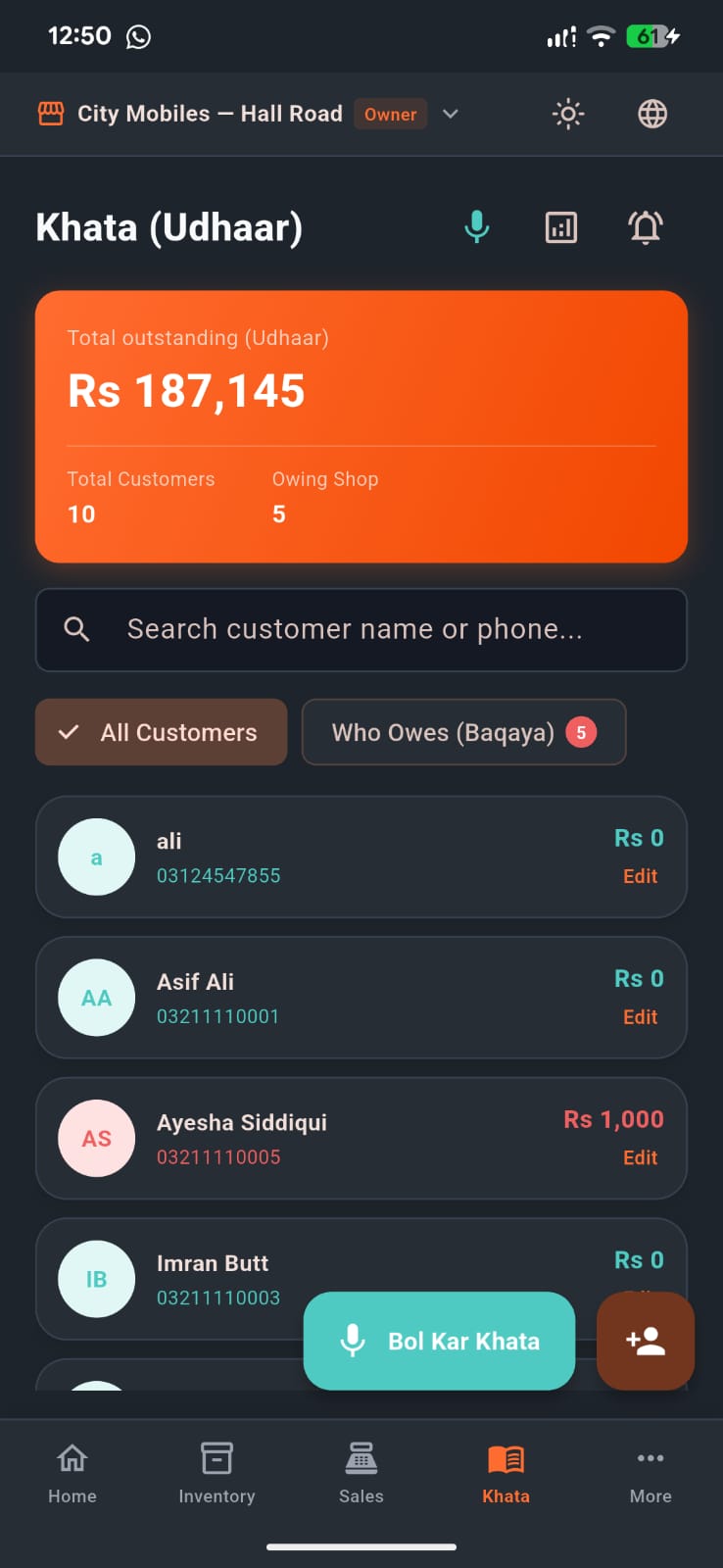
Customer List with Live Balancesتمام گاہکوں کی فہرست اور واجب الادا رقم
Customer Ledger & WhatsApp PDF Shareمکمل کھاتہ تفصیل اور واٹس ایپ پی ڈی ایف
How to Manage Customer Balances:گاہک کھاتہ چلانے کا طریقہ:
-
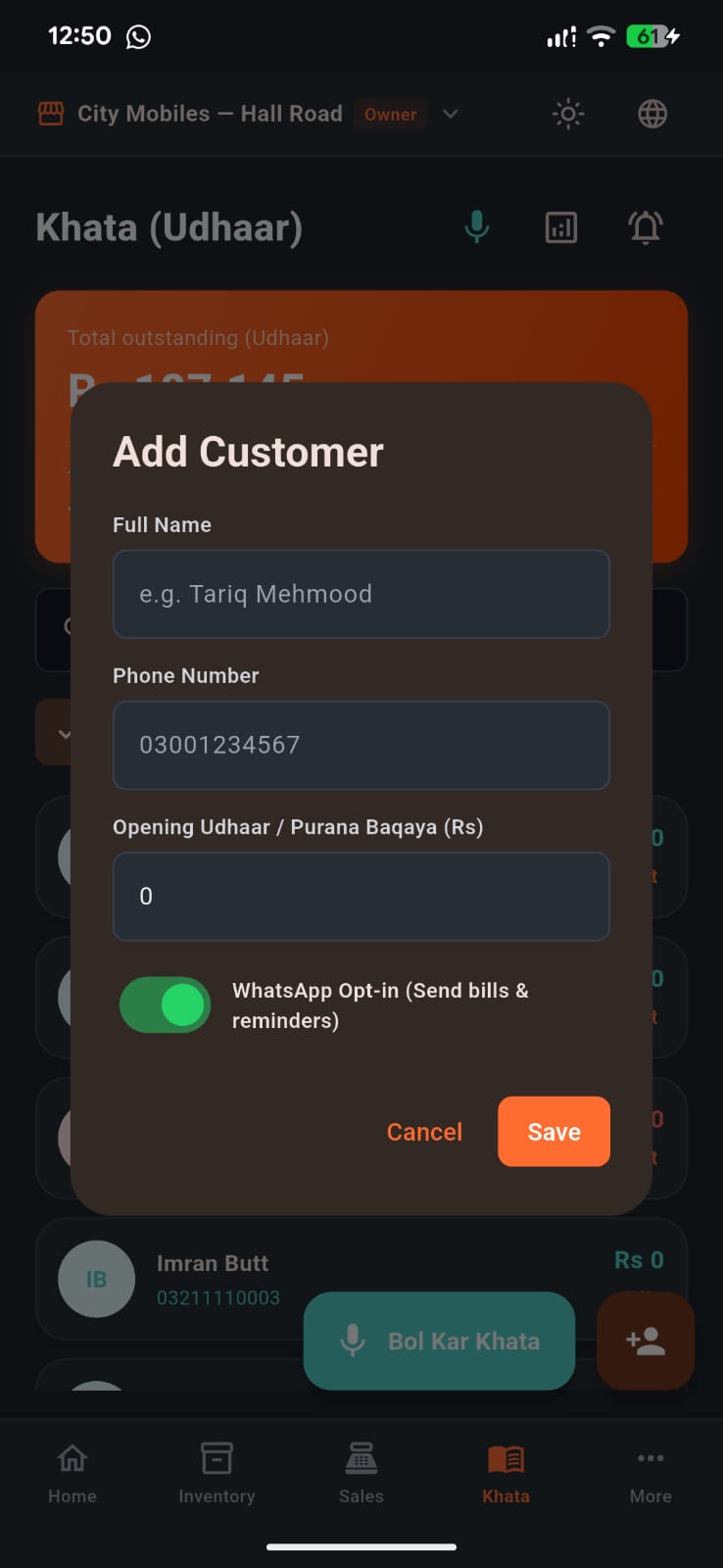
Add Customer: Tap
+ Add Customer, type their name, mobile number, and old paper register balance under Already Owes You. نیا گاہک شامل کریں:+ Add Customerدبائیں، نام، فون نمبر اور پرانے کھاتے کا بقایا لکھ کر محفوظ کریں۔ -
Give Udhaar (+): Tap customer name >
Give Udhaar, enter the amount and item description. Balance increases in Red. ادھار دیں (+): گاہک کے نام پر ٹیپ کریں اورGive Udhaarدبا کر رقم اور تفصیل لکھیں۔ ادھار سرخ رنگ میں بڑھ جائے گا۔ -
Receive Payment (-): When customer pays cash or JazzCash, tap
Receive Money, enter amount. Balance immediately reduces. رقم وصول کریں (-): جب گاہک نقد یا آن لائن پیسے دے،Receive Moneyدبائیں اور رقم لکھیں۔ باقی رقم فوراً کم ہو جائے گی۔ - Share PDF Statement on WhatsApp: Tap the green WhatsApp button to generate a clean, branded PDF statement and send it directly to the customer. واٹس ایپ پر پی ڈی ایف کھاتہ بھیجیں: سبز واٹس ایپ بٹن دبائیں اور گاہک کو اس کا مکمل حساب کتاب پی ڈی ایف کی شکل میں بھیجیں۔
5 "Bol Kar Khata" — Voice-to-Ledger Entry بول کر کھاتہ — کمال کی صوتی انٹری AI Featureجدید فیچر
Pakistan's first voice khata feature made for busy shopkeepers. No need to type with dusty or greasy hands while working on the counter — just tap the mic and speak! مصروف دکانداروں کے لیے پاکستان کا پہلا "بول کر کھاتہ" فیچر۔ کام کے دوران ہاتھ مصروف ہوں یا میلے ہوں، ٹائپ کرنے کی کوئی ضرورت نہیں — بس مائیک دبائیں اور بولیں!
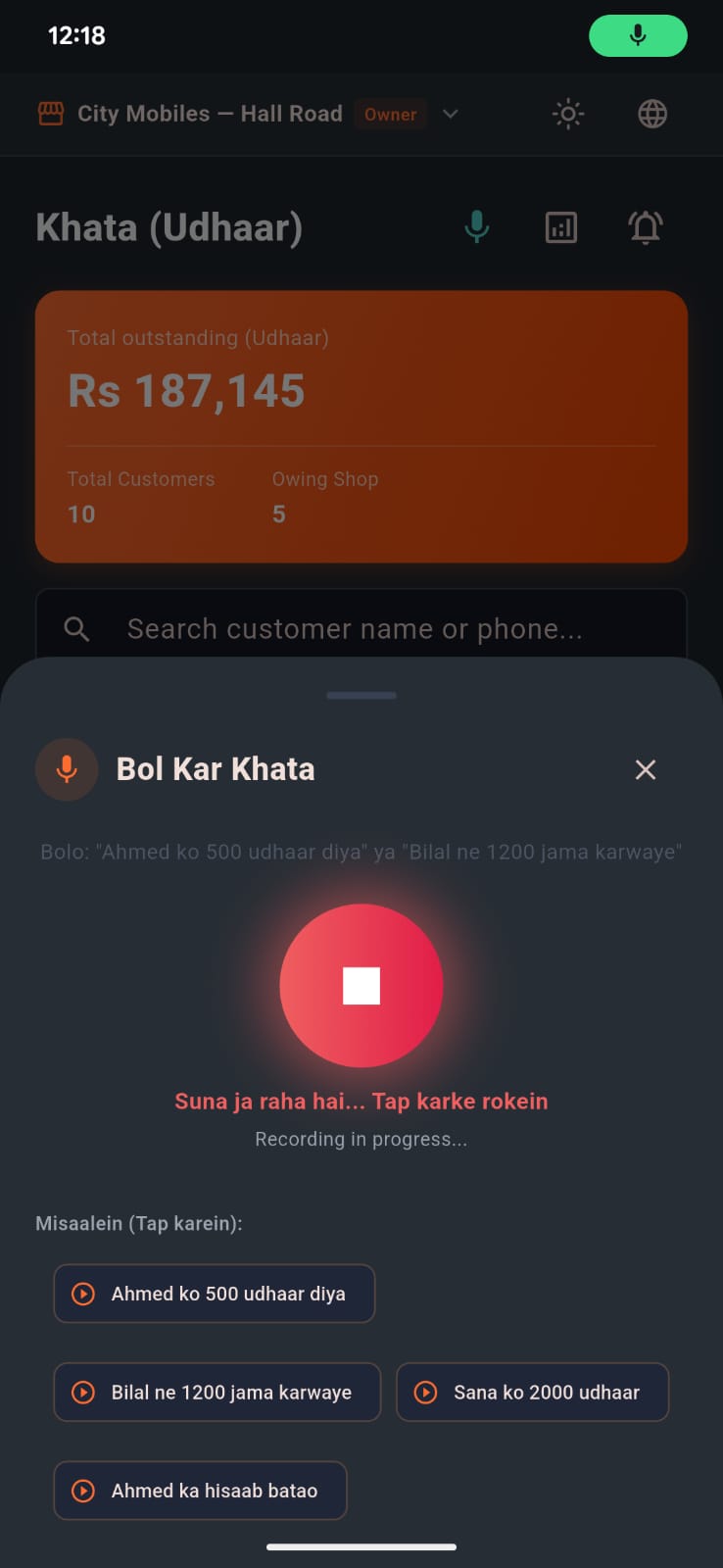
How Voice Udhaar Works: بول کر کھاتہ کیسے کام کرتا ہے:
- Tap the orange floating Microphone 🎙️ button on the Khata screen. کھاتہ سکرین پر موجود اورنج مائیکروفون 🎙️ بٹن کو دبائیں۔
-
Speak naturally in Urdu or Roman Urdu:
• "Waqas Javed 0321 9876543 5 hazar udhar"
• "Nadia se 3000 wasool hue"
• "Ahmed Khan ko 1500 ka samaan diya" عام انداز میں بولیں:
• "وقاص جاوید 0321 9876543 پانچ ہزار ادھار"
• "نادیہ سے 3000 وصول ہوئے"
• "احمد خان کو 1500 کا سامان دیا" - The intelligent parser extracts the Customer Name, Mobile Number, Amount, and Transaction Type (Udhaar vs Wasooli). ایپ خود بخود گاہک کا نام، فون نمبر، رقم اور ادھار یا وصولی کو الگ الگ خانوں میں بھر دیتی ہے۔
- Tap Confirm & Add to Khata. The entry is recorded with zero typing effort! محفوظ کریں دبائیں اور بغیر کسی ٹائپنگ کے اندراج مکمل ہو جائے گا!
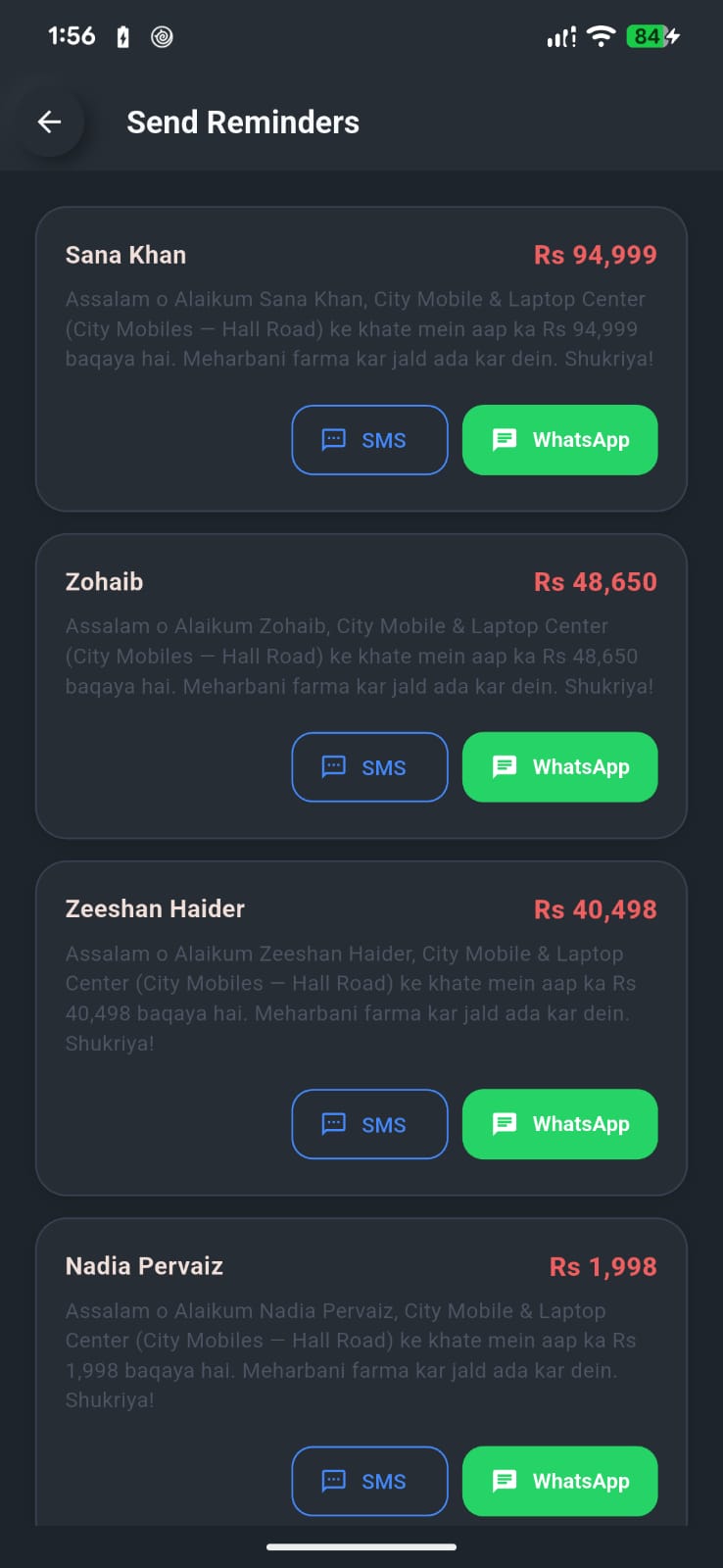
6 WhatsApp Payment Reminders — Recover Udhaar 3x Faster واٹس ایپ یاد دہانی — ادھار کی فوری اور باعزت وصولی
Calling customers asking for money can feel awkward and damages shop relationships. PakkaHisaab generates polite, professional automated WhatsApp reminder messages with their exact balance and shop name. بار بار فون کر کے ادھار مانگنا دکاندار اور گاہک دونوں کے لیے ناگوار ہوتا ہے۔ پکا حساب نہایت مہذب اور پیشہ ورانہ واٹس ایپ پیغامات خود تیار کرتا ہے جس سے تعلق خراب ہوئے بغیر رقم واپس مل جاتی ہے۔
1-Tap WhatsApp Recovery Slips ایک کلک پر واٹس ایپ پیغام
- Open the Reminders menu. The app automatically lists all debtors sorted by urgency and balance. یاد دہانی مینو کھولیں۔ ایپ تمام ادھار والے گاہکوں کو بقایا رقم کے لحاظ سے ترتیب دیتی ہے۔
- Tap the green WhatsApp button next to any customer. کسی بھی گاہک کے سامنے سبز واٹس ایپ بٹن دبائیں۔
- WhatsApp opens directly with the customer's chat and a ready-made polite reminder message already filled in. Just press Send! واٹس ایپ خود بخود گاہک کی چیٹ میں مکمل تیار پیغام اور بقایا رقم کے ساتھ کھل جاتا ہے۔ بس سینڈ کا بٹن دبائیں!
7 Sales Register, Invoice History & Mobile POS سیلز رجسٹر، بل ہسٹری اور موبائل پوائنٹ آف سیل (POS) Business Planبزنس پلان
Complete control over your store counter. Review past sales, track received cash vs pending udhaar, inspect full invoice breakdowns, print wireless thermal slips, handle customer returns and exchanges, or switch to the 1-tap POS counter with high-speed camera barcode and IMEI scanning. دکان کے کاؤنٹر کا مکمل کنٹرول۔ پرانے اور نئے بلوں کی پڑتال، موصولہ کیش اور باقی ادھار کا موازنہ، بل کی تفصیلی رسید، وائرلیس تھرمل پرنٹنگ، مال کی واپسی اور تبادلہ، اور کیمرے سے بارکوڈ سکیننگ کے ساتھ تیز ترین بلنگ۔
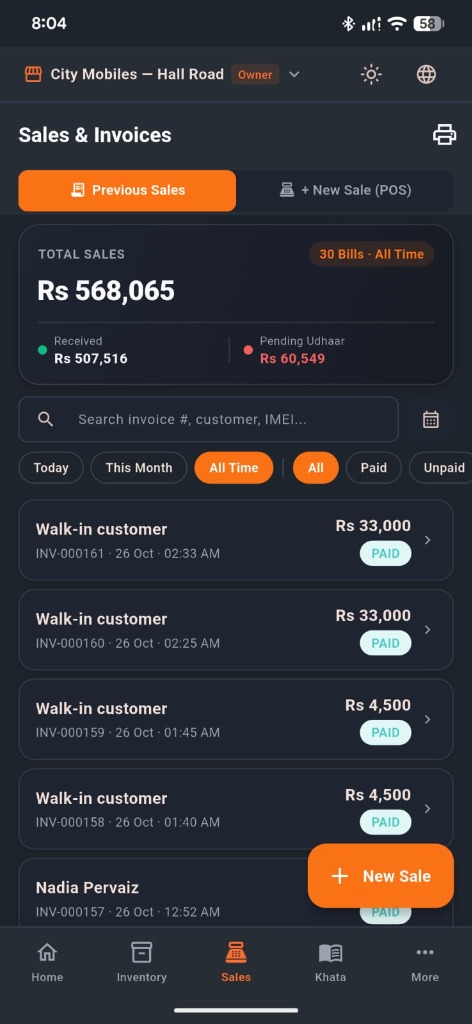
Sales & Invoices Register (Previous Sales) سیلز اور بل رجسٹر (سابقہ بل اور ادھار ریکارڈ)
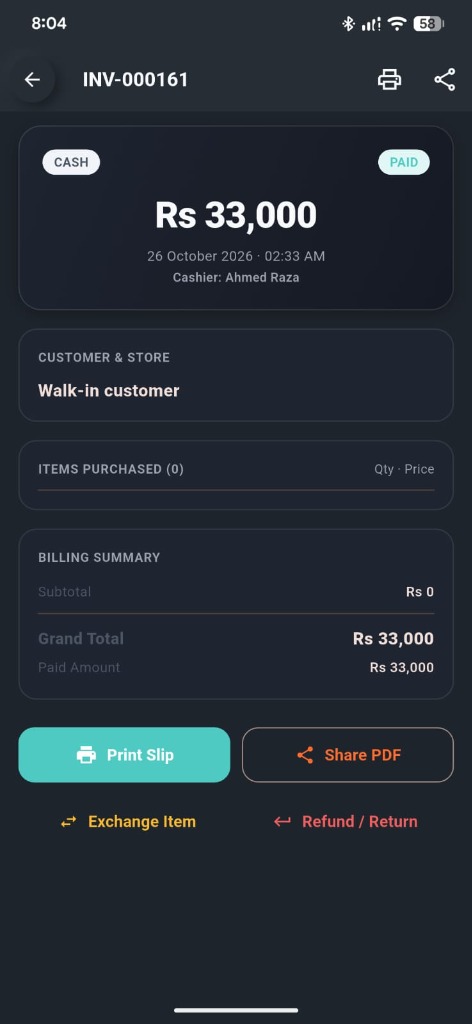
Invoice Detail, Print Slip & Returns بل کی تفصیل، پرنٹ رسید اور واپسی/تبادلہ
1. Sales & Invoices Register ("Previous Sales" Tab): 1. سیلز اور بل رجسٹر (سابقہ بل اور مکمل ریکارڈ):
- Dual Sub-Tabs: The top header lets you toggle effortlessly between Previous Sales (to review transactions and collections) and + New Sale (POS) (to open the sales catalog and scanner). ڈبل ٹیب سسٹم: اوپر دی گئی پٹی سے آپ ایک کلک میں Previous Sales (پرانے بل اور وصولی) اور + New Sale (POS) (نیا بل کاؤنٹر) کے درمیان سوئچ کر سکتے ہیں۔
-
Total Sales & Cash Flow Summary Card: Displays real-time aggregate performance metrics:
• Total Sales: Gross sales revenue across the selected timeframe (e.g.Rs 568,065).
• Bill Count Badge: Total invoices finalized (e.g.30 Bills · All Time).
• Received (🟢): Total liquid cash or online payments collected at the counter (e.g.Rs 507,516).
• Pending Udhaar (🔴): Outstanding credit balances awaiting recovery (e.g.Rs 60,549). سیلز اور کیش فلو سمری کارڈ: دکان کی کارکردگی کا فوری جائزہ:
• ٹوٹل سیلز: منتخب مدت کی کل سیل (جیسےRs 568,065)۔
• کل بلز: کاٹے گئے بلوں کی تعداد (جیسے30 Bills · All Time)۔
• وصول شدہ رقم (🟢): نقد یا آن لائن موصولہ رقم (جیسےRs 507,516)۔
• باقی ادھار (🔴): مارکیٹ میں پھنسا ہوا بقایا ادھار (جیسےRs 60,549)۔ -
Live Search & Calendar Date Picker: Find any past transaction instantly by typing the Invoice # (e.g.
INV-000161), Customer Name (e.g.Walk-in customer,Nadia Pervaiz), or product IMEI / Serial Number. Tap the Calendar icon (📅) to select single-day or custom date spans. لائیو تلاش اور کیلنڈر تاریخ فلٹر: انوائس نمبر (جیسےINV-000161)، گاہک کے نام یا موبائل کے IMEI نمبر سے بل فوراً تلاش کریں۔ مخصوص تاریخ کے بل دیکھنے کے لیے کیلنڈر آئیکن (📅) پر ٹیپ کریں۔ -
Quick Filter Chips: Filter with a single tap:
• Time Filters:Today(آج),This Month(موجودہ مہینہ),All Time(مکمل تاریخ).
• Payment Status:All(تمام بل),Paid(مکمل ادا شدہ),Unpaid(ادھار / نامکمل). فوری فلٹر چپس: ایک کلک پر فلٹر کریں:
• مدت:Today(آج),This Month(اس ماہ),All Time(اب تک کی کل سیلز)۔
• ادائیگی سٹیٹس:All(سب),Paid(مکمل کیش/آن لائن),Unpaid(ادھار پر جاری کردہ)۔ -
Invoice History Feed & Quick FAB: Every invoice card displays customer title, unique bill code, exact timestamp (e.g.
26 Oct · 02:33 AM), grand amount (e.g.Rs 33,000), and status tag (PAID/UNPAID). The orange + New Sale floating action button at the bottom right allows you to initiate a new checkout anytime. بلز لسٹ اور فوری نیا بل (+): ہر بل کارڈ پر گاہک کا نام، بل نمبر، درست وقت اور تاریخ، کل رقم اور سٹیٹس واضح ہوتا ہے۔ نیچے دائیں جانب اورنج + New Sale بٹن دبا کر فوری نیا بل کاٹ سکتے ہیں۔
2. Invoice Detail, Slip Printing & Returns: 2. بل کی مکمل تفصیل، رسید پرنٹنگ اور واپسی/تبادلہ:
-
Header & Audit Trail: Tapping any bill opens its dedicated audit sheet showing the official Invoice Number (e.g.
INV-000161), top print shortcut, and share button. آڈٹ اور بل ہیڈر: کسی بھی بل پر ٹیپ کرنے سے اس کی مکمل فائل کھلتی ہے جس میں انوائس نمبر، رسید پرنٹ اور شیئر کے آپشن اوپر موجود ہوتے ہیں۔ -
Payment Badges & Cashier Attribution: Prominently displays the settlement channel (e.g.
CASH,JAZZCASH,EASYPAISA,UDHAAR), payment status (PAID), total billed amount (Rs 33,000), and the exact cashier responsible (e.g.Cashier: Ahmed Raza) to prevent theft and ensure staff accountability. ادائیگی طریقہ اور کیشئیر کا نام: ادائیگی کی قسم (کیش، جاز کیش، ایزی پیسہ یا ادھار)، سٹیٹس، بل کی رقم اور بل بنانے والے ملازم کا نام (جیسےCashier: Ahmed Raza) درج ہوتا ہے تاکہ عملے کا حساب کتاب شفاف رہے۔ - Customer, Items & Billing Summary: Inspect the customer profile, itemized inventory lines with purchased quantities and unit prices, subtotal, and paid amount. گاہک اور خریدی گئی اشیاء: گاہک کا نام، خریدی گئی اشیاء، تعداد، ریٹ، سب ٹوٹل اور ادا شدہ رقم کی مکمل تفصیل دیکھی جا سکتی ہے۔
-
4 Instant Operational Actions:
• Print Slip (پرنٹ سلپ - Cyan Button): Sends the receipt instantly to your paired 58mm or 80mm wireless Bluetooth thermal printer.
• Share PDF (پی ڈی ایف شیئر - Dark Button): Exports a formatted digital PDF receipt with your store branding, address, and phone number to send via WhatsApp or email.
• ⇄ Exchange Item (تبدیلی): Facilitates immediate customer product swaps (e.g. exchanging for another phone color or charger model) with automatic price difference calculations.
• ⇄ Refund / Return (واپسی - Red Button): One-tap return handling that restores stock counts to inventory and adjusts drawer cash or customer khata credit. 4 فوری کاؤنٹر ایکشنز:
• Print Slip (پرنٹ سلپ): ایک کلک پر بلیوٹوتھ تھرمل پرنٹر (58mm/80mm) سے دکان کی پکی رسید نکالیں۔
• Share PDF (پی ڈی ایف شیئر): دکان کے نام اور فون نمبر کے ساتھ ڈیجیٹل پی ڈی ایف بل واٹس ایپ پر گاہک کو روانہ کریں۔
• ⇄ Exchange Item (تبدیلی): گاہک کی چیز بدلنے کی صورت میں فوری ایڈجسٹمنٹ کریں۔
• ⇄ Refund / Return (واپسی): مال کی واپسی پر مال دوبارہ سٹاک میں شامل ہو جاتا ہے اور کیش یا کھاتہ بیلنس خود بخود درست ہو جاتا ہے۔
Mobile POS Counter & High-Speed Barcode / IMEI Scanner موبائل POS کاؤنٹر اور کیمرے سے بارکوڈ / IMEI سکیننگ
Switch to + New Sale (POS) to turn your smartphone into a laser-fast billing counter with real-time stock deductions and camera scanning. + New Sale (POS) پر ٹیپ کریں اور اپنے موبائل کو فوری کیمرہ بارکوڈ سکینر اور جدید کاؤنٹر سیل مشین میں تبدیل کریں۔
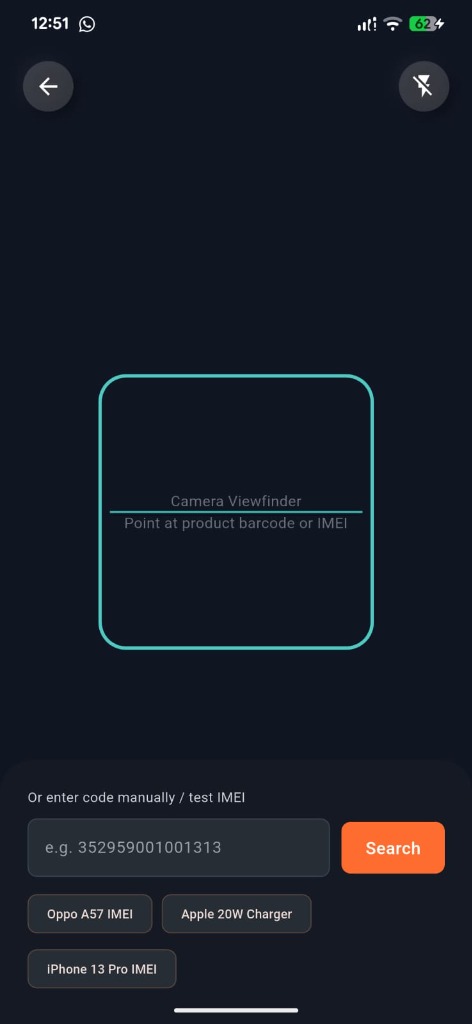
Live Camera Barcode & IMEI Scannerکیمرہ بارکوڈ اور موبائل IMEI سکینر
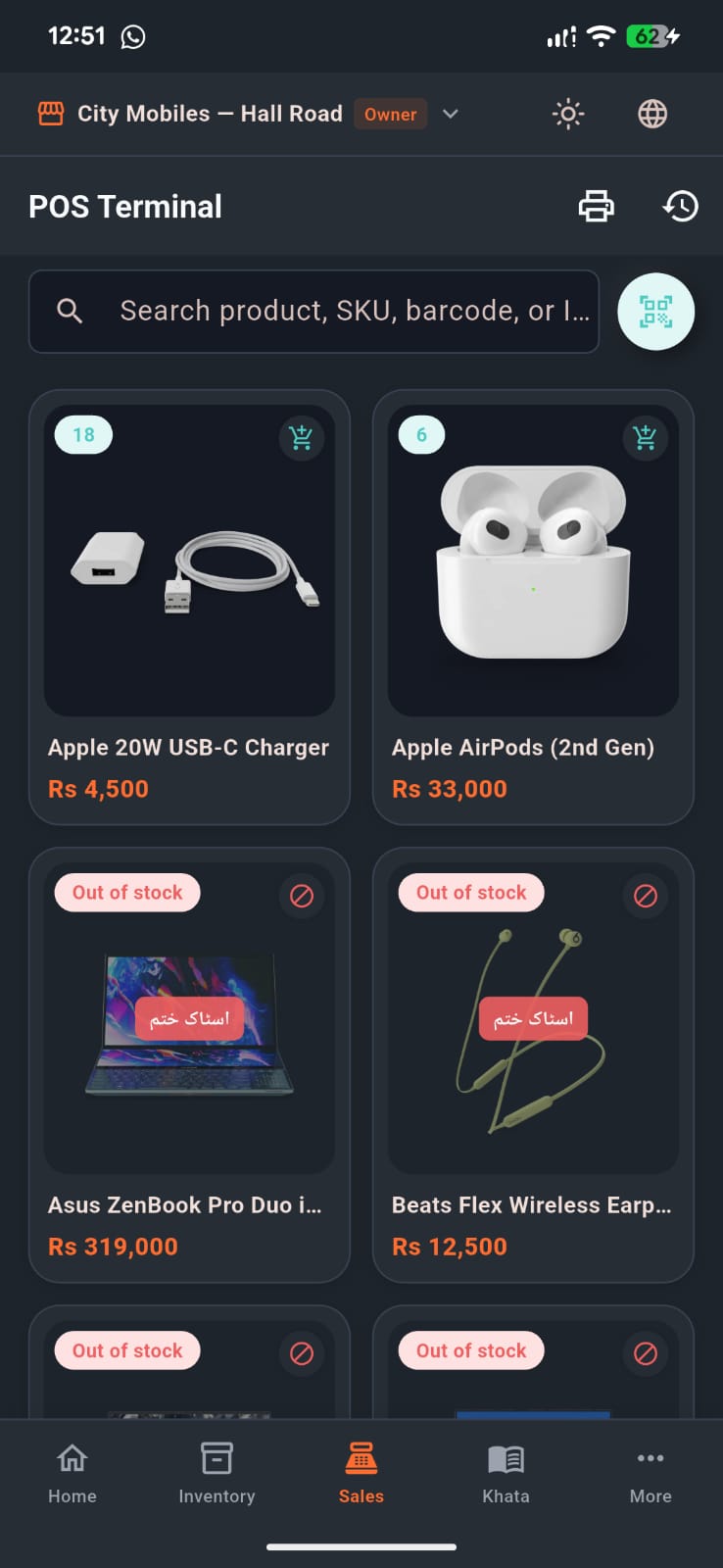
Mobile POS Catalog & 1-Tap Cartموبائل کاؤنٹر سیل اور فوری کارٹ
Features of Mobile POS & Camera Scanner: موبائل سیل (POS) اور کیمرہ سکینر کی خصوصیات:
- Camera Scanner Button (📷): Tap in POS search or stock to open the high-speed viewfinder. Point at any barcode or phone box IMEI to add to cart or lookup product instantly.کیمرہ سکینر بٹن (📷): کیمرہ کھولیں اور کسی بھی پروڈکٹ کا بارکوڈ یا موبائل باکس سکین کر کے فوری کارٹ میں شامل کریں۔
- Manual Search & Quick Test Chips: Search by barcode/IMEI manually or tap quick test chips (e.g. Oppo A57, Apple 20W Charger, iPhone 13 Pro).دستی تلاش: اگر بارکوڈ نہ ہو تو ہاتھ سے IMEI درج کریں یا فوری چپس پر ٹیپ کریں۔
- Smart Catalog & Category Filters: Filter by Mobile Phones, Accessories, Chargers, or Cables with live stock counts.کیٹیگری فلٹرز: فونز، ایکسیسریز، چارجر یا کیبلز کے لحاظ سے لائیو سٹاک دیکھیں۔
- IMEI Protection: When selling a mobile phone, the app requires selecting the exact IMEI, preventing duplicate or incorrect sales.IMEI تحفظ: فون بیچتے وقت مخصوص IMEI منتخب کرنا لازمی ہوتا ہے تاکہ غلط مال نہ بک سکے۔
- Floating Cart Bar: Shows live item count, customer name, and bill total. Tap to proceed to checkout.لائیو کارٹ بار: کل اشیاء، گاہک کا نام اور ٹوٹل رقم نیچے لائیو نظر آتی ہے۔
8 Split Checkout — Cash, JazzCash & Khata Udhaar in One Bill نقد، جاز کیش اور کھاتہ ادھار کی بیک وقت بلنگ
In Pakistan, customers rarely pay 100% cash. They might pay Rs 30,000 cash, Rs 10,000 via JazzCash, and put the remaining Rs 11,700 on their udhaar khata. PakkaHisaab handles multi-mode split payments automatically! پاکستانی مارکیٹ میں اکثر گاہک کچھ رقم نقد، کچھ جاز کیش اور باقی ادھار کھاتے میں لکھواتے ہیں۔ پکا حساب یہ تمام ادائیگیاں خود بخود ایک ہی بل میں تقسیم کر کے کھاتہ اپ ڈیٹ کر دیتا ہے!
How Split Checkout Works: تقسیم ادائیگی کا طریقہ:
- Select or attach customer (e.g. Nadia Pervaiz). The screen shows Customer Attached. گاہک منتخب یا اٹیچ کریں (مثلاً نادیہ پرویز)۔ سکرین پر Customer Attached نظر آئے گا۔
- Select payment method: Cash, Add to Khata (ادھار / کھاتہ), JazzCash, Easypaisa, Bank Transfer, or Card. ادائیگی کا طریقہ منتخب کریں: کیش، ادھار کھاتہ، جاز کیش، ایزی پیسہ، بینک ٹرانسفر یا کارڈ۔
- Enter or verify total bill (e.g. Rs 42,000 for 3 items) and cash/payment received. کل بل (مثلاً 3 آئٹمز کے 42,000 روپے) اور موصولہ رقم کی تصدیق کریں۔
- Add an optional reference note or invoice remark if required. ضرورت پڑنے پر حوالہ یا نوٹ (Optional Note) درج کریں۔
- Tap Confirm Sale to instantly complete the sale, update customer ledger, and print receipt! کنفرم سیل (Confirm Sale) دبائیں، بل محفوظ ہو کر کھاتے میں درج ہو جائے گا اور رسید نکل آئے گی!
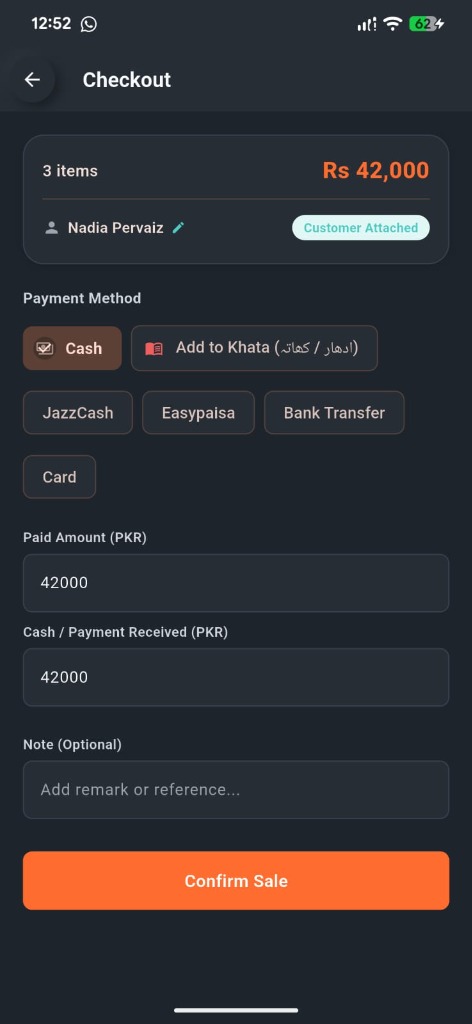
Fast Checkout with Split Payment & Khataکسٹمر ٹیگ، کیش اور کھاتہ ادھار بلنگ
9 Bluetooth Thermal Printing — Wireless Customer Receipts بلیوٹوتھ تھرمل رسید — وائرلیس گاہک بل پرنٹنگ
No cables, no expensive desktop computers required. Connect your phone via Bluetooth to any cheap 58mm or 80mm ESC/POS thermal printer and hand customers official thermal receipts. نہ تاروں کا جھنجھٹ، نہ کمپیوٹر کی ضرورت۔ اپنے موبائل کو بلیوٹوتھ کے ذریعے کسی بھی سستے تھرمل پرنٹر سے جوڑیں اور دکان کے نام والا پکا بل نکالیں۔
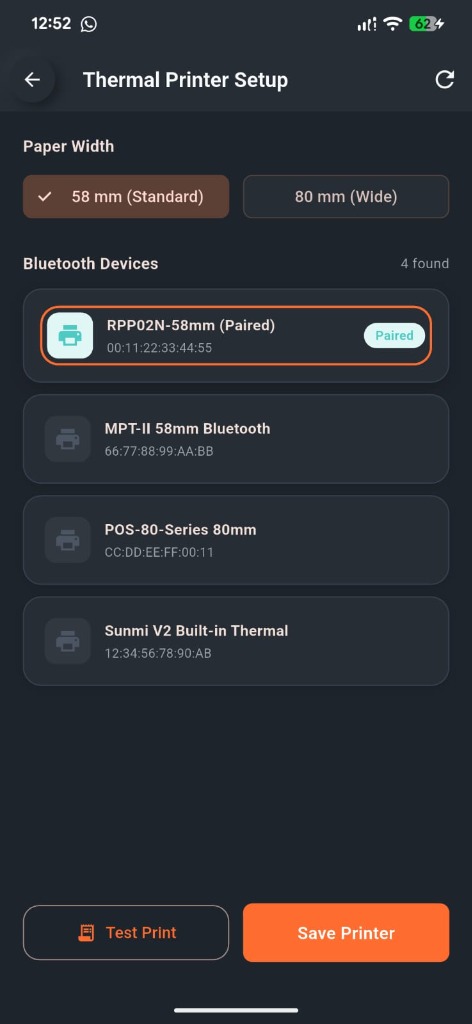
1-Tap Bluetooth Printer Pairing (58mm / 80mm)بلیوٹوتھ پرنٹر سیٹنگ اور ٹیسٹ سلپ
Setting up Your Wireless Printer in 30 Seconds:وائرلیس پرنٹر سیٹ کرنے کا طریقہ:
- Turn on your Bluetooth Thermal Printer.اپنا بلیوٹوتھ تھرمل پرنٹر آن کریں۔
- Go to Menu > Printer Settings in PakkaHisaab Mobile.ایپ میں مینو ← پرنٹر سیٹنگز کھولیں۔
- Select paper size: 58 mm (Standard) or 80 mm (Wide).پیپر سائز منتخب کریں: 58 ملی میٹر (معیاری) یا 80 ملی میٹر (چوڑا)۔
- Tap your paired printer from the discovered Bluetooth devices list (e.g. RPP02N-58mm) and tap Test Print.فہرست سے اپنے پرنٹر پر ٹیپ کریں (جیسے RPP02N-58mm) اور Test Print نکال کر تسلی کریں۔
- Tap Save Printer to set it as default for all customer receipts.Save Printer دبائیں تاکہ تمام رسیدیں خودکار طور پر اسی پرنٹر پر نکلیں۔
10 Products & IMEI Stock Tracking پروڈکٹس، سٹاک اور موبائل IMEI ٹریکنگ Business Planبزنس پلان
Know exactly what is in your shop, what is running out, and track high-value phones and laptops by their unique IMEI and serial numbers so nothing gets lost or stolen. جانیں کہ دکان میں کتنا مال موجود ہے، کیا چیز ختم ہو رہی ہے، اور قیمتی فونز کو ان کے منفرد IMEI نمبر کے ساتھ محفوظ رکھیں تاکہ کوئی چیز چوری یا غائب نہ ہو۔
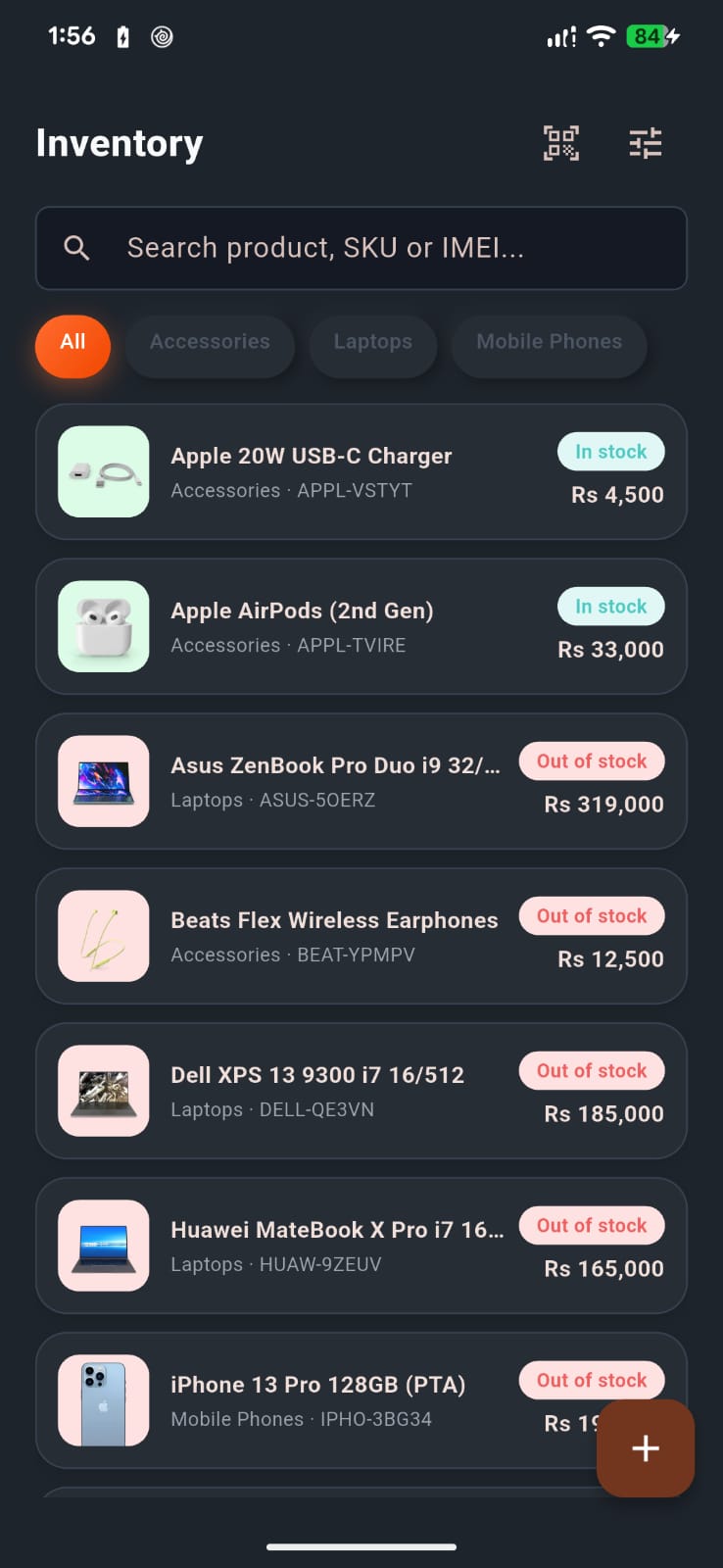
Mobile Stock Management Features: موبائل سٹاک کے اہم فیچرز:
- Individual IMEI Tracking: Save dual-SIM IMEIs for every smartphone in stock. Check warranty and sale date with one scan.ہر فون کا الگ IMEI: ہر ڈوئل سم فون کے دونوں IMEI ریکارڈ کریں اور ایک سکین سے معلوم کریں کہ فون کب اور کس کو بیچا گیا۔
- Low Stock Warning Alerts: The bell icon lights up whenever an item falls below your minimum safety quantity.کم سٹاک کا الرٹ: جب بھی کوئی آئٹم کم رہ جائے، ایپ گھنٹی کے نشان کے ساتھ فوراً الرٹ دیتی ہے۔
- Stock Valuation: View your total warehouse value at purchase cost in real time.سٹاک کی کُل مالیت: قیمت خرید کے لحاظ سے دکان میں موجود مال کی کل مالیت فوری دیکھیں۔
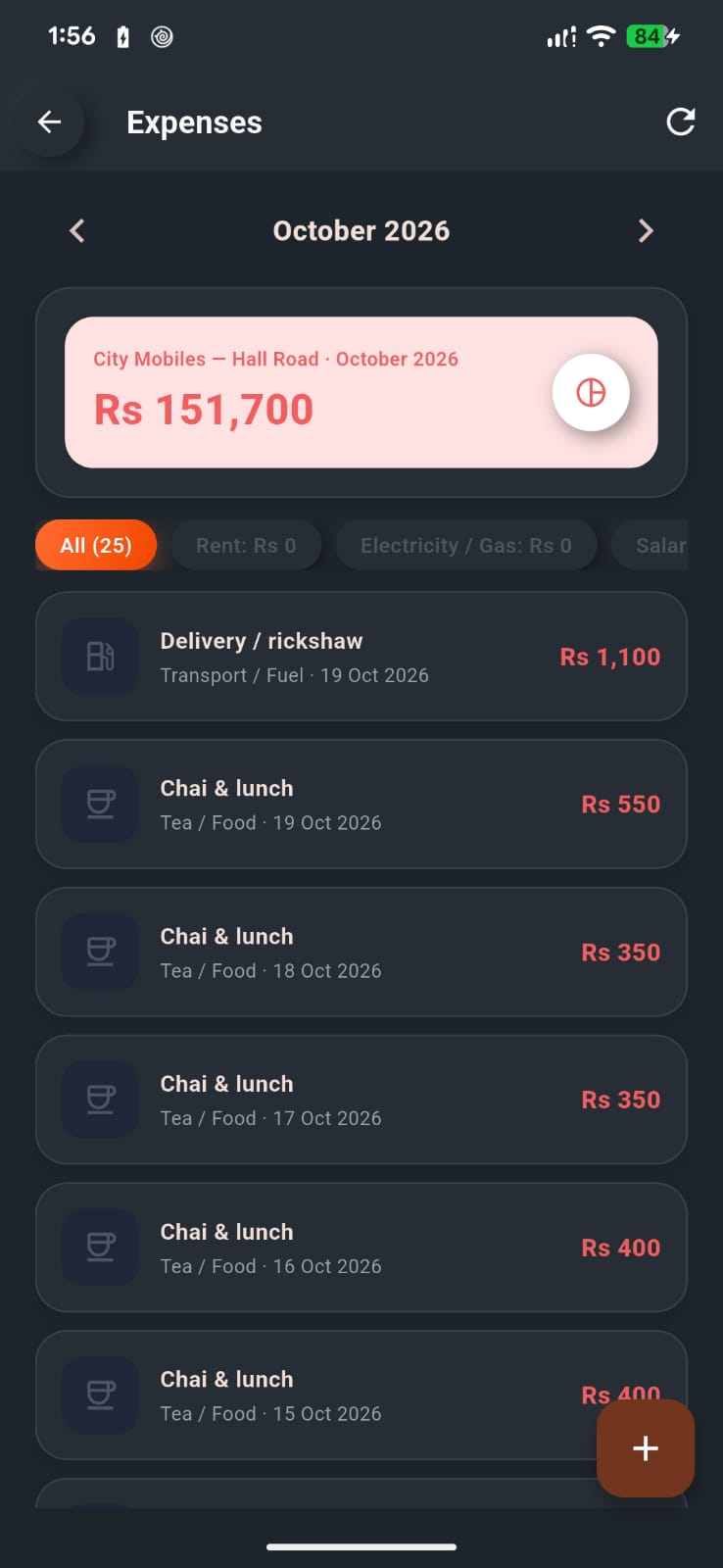
11 Daily Shop Expenses & Real Net Profit دکان کے روزانہ کے اخراجات اور اصل خالص منافع
Sales alone do not tell you if you made money. To see your true profit, you must deduct shop rent, electricity bills, chai/refreshments, staff wages, and supplier freight. صرف سیل دیکھنا کافی نہیں ہوتا۔ اصل منافع تب سامنے آتا ہے جب دکان کا کرایہ، بجلی کا بل، چائے، ملازمین کی تنخواہ اور مال کا کرایہ نکالا جائے۔
Automated Profit & Loss Formula منافع اور نقصان کا خودکار فارمولا
مجموعی سیل − مال کی قیمت خرید − دکان کے اخراجات = اصل خالص منافع
- Tap
+ Add Expenseon Dashboard or More menu.ڈیش بورڈ یا مینو سے+ Add Expenseدبائیں۔ - Select category: Rent, Utilities, Chai/Food, Transport, Salary.قسم منتخب کریں: کرایہ، بجلی، چائے/کھانا، ٹرانسپورٹ، تنخواہ۔
- Enter amount and payment mode (Cash / JazzCash).رقم اور ادائیگی کا طریقہ لکھیں۔
- Your Net Profit recalculates instantly on your mobile screen.آپ کا اصل منافع سکرین پر فوراً اپ ڈیٹ ہو جاتا ہے۔
12 Reports & Business Analytics (Web Parity) رپورٹس اور کاروباری منافع کا مکمل حساب
Comprehensive financial audit matching the Web ERP: view live gross & net profits, cash received vs udhaar, top-selling phones, staff sales, and full 12-month month-by-month history. ویب ڈیش بورڈ کی طرح مکمل فنانشل رپورٹ: کل سیلز، موصول نقد رقم، اصل خالص منافع، زیادہ بکنے والے موبائل اور پچھلے 12 مہینوں کا مکمل موازنہ۔
Real-Time Mobile Financial Audit:لائیو کاروباری رپورٹ اور نفع و نقصان:
- Counter Sales Volume: Rs 122,570 across 9 invoices (avg Rs 13,619 per sale).کاؤنٹر سیلز: 9 بلوں میں 122,570 روپے کی فروخت (اوسط بل 13,619 روپے)۔
- Total Received: Rs 77,025 (Rs 73,020 sale cash + Rs 4,005 old khata recovered).کل وصولی: 77,025 روپے (کاؤنٹر کیش جمع پرانے ادھار کی وصولی)۔
- Gross & Net Profit: Accurate Rs 8,460 net profit calculated after cost of goods and shop expenses.خالص منافع: مال کی خرید اور دکان کے تمام اخراجات نکالنے کے بعد اصل منافع (8,460 روپے)۔
- Interactive Daily Bar Chart: Tap any day to inspect daily sales vs profit trends with color-coded bars.روزانہ بار گراف: ہر دن کی سیلز اور منافع کا واضح تقابلی گراف۔
- 1-Tap Timeframes: Instant filters for Today, Yesterday, Last 7 days, and This month.وقت کے فلٹرز: آج، کل، پچھلے 7 دن اور موجودہ مہینے کا حساب ایک کلک پر۔
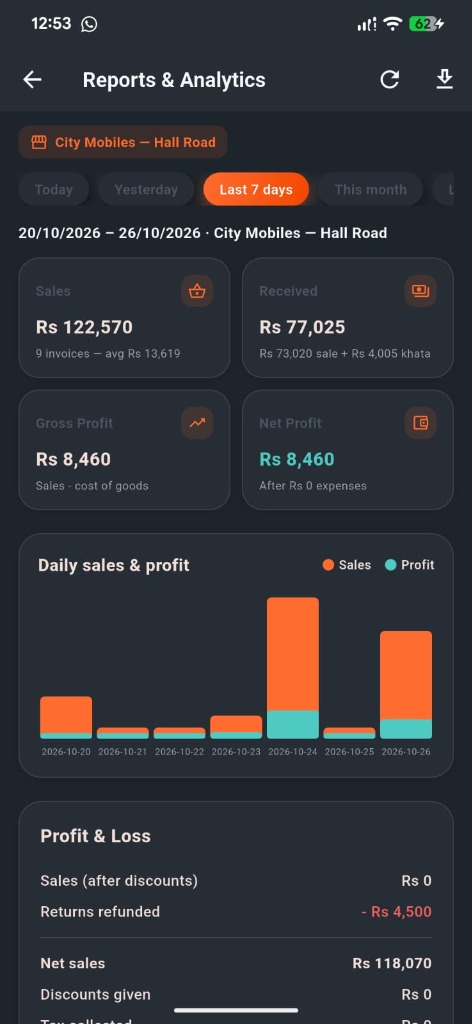
Reports & Analytics (Last 7 Days P&L)رپورٹس اور کاروباری منافع کا حساب
Core Financial Metrics & P&Lاہم کاروباری اشاریے اور نفع و نقصان
- Sales & Invoices: Total counter volume, total bills cut, and average basket value.کل سیلز اور بل: کاؤنٹر سے بیچی گئی کل رقم، بلوں کی تعداد اور اوسط بل۔
- Total Received: Accurate sum of counter cash + customer udhaar recoveries.کل موصول شدہ کیش: کاؤنٹر سیل کی نقد رقم جمع گاہکوں سے وصول شدہ ادھار۔
- Gross vs Net Profit: See real profit after subtracting product purchase costs and shop expenses.خام اور خالص منافع: مال کی خرید قیمت اور دکان کے تمام اخراجات نکالنے کے بعد اصل بچت۔
- Timeframe Filters: 1-tap audit for Today, Yesterday, Last 7 days, This month, Last month, and This year.وقت کے فلٹرز: آج، گزشتہ کل، پچھلے 7 دن، موجودہ مہینہ، گزشتہ مہینہ، اور پورا سال۔
Deep Breakdowns & Historyتفصیلی لسٹیں اور تاریخ
- Top Products: Ranks products by sold quantity, revenue, and gross profit margin.زیادہ بکنے والے آئٹمز: تعداد، کل سیل اور منافع کے حساب سے درجہ بندی۔
- Sales by Staff & Category: Monitor staff billing performance and revenue by item category.سیلز بوائز کی سیل: ہر ملازم کی انفرادی سیل اور کیٹیگری وائز آمدنی۔
- Khata & Suppliers: New udhaar given vs recovered, and distributor purchases vs payments.ادھار اور سپلائرز: مارکیٹ میں دیا گیا ادھار بمقابلہ وصولی اور سپلائرز کی ادائیگیاں۔
- 12-Month Comparison: Month-by-month table auditing sales, profits, and expenses across the year.12 مہینوں کا گوشوارہ: پورے سال کا ماہانہ نفع، اخراجات اور سیلز کا موازنہ۔
13 Multiple Shops & Staff Permissions ایک سے زیادہ دکانیں اور ملازمین کے اختیارات
Have 2 or 3 shops? Or hiring sales boys to run the counter? Give your salesmen their own mobile logins while completely hiding your sensitive cost prices and profits. کیا آپ کی 2 یا 3 دکانیں ہیں؟ یا کاؤنٹر پر لڑکے رکھے ہیں؟ ملازمین کو ان کا اپنا لاگ اِن دیں جس میں وہ قیمت خرید اور منافع نہیں دیکھ سکیں گے۔
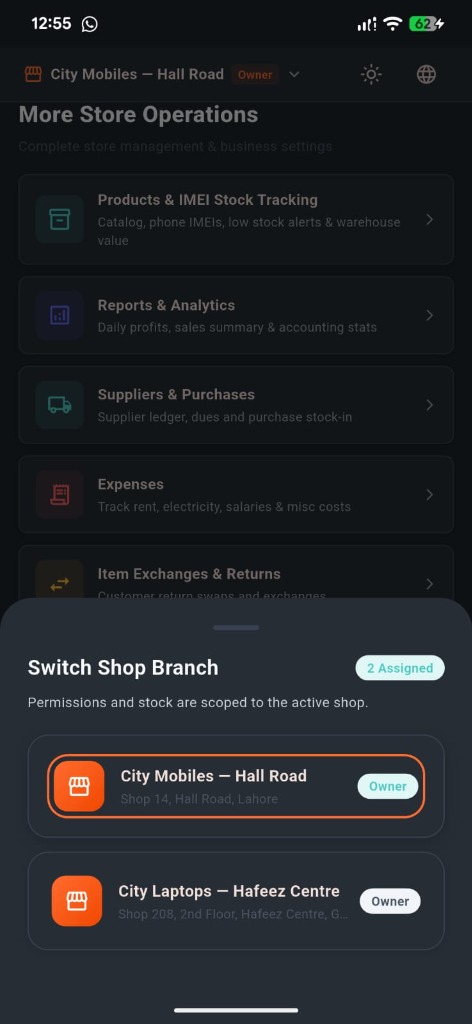
1-Tap Multi-Shop Branch Switcherایک کلک پر دکان یا برانچ تبدیل کریں
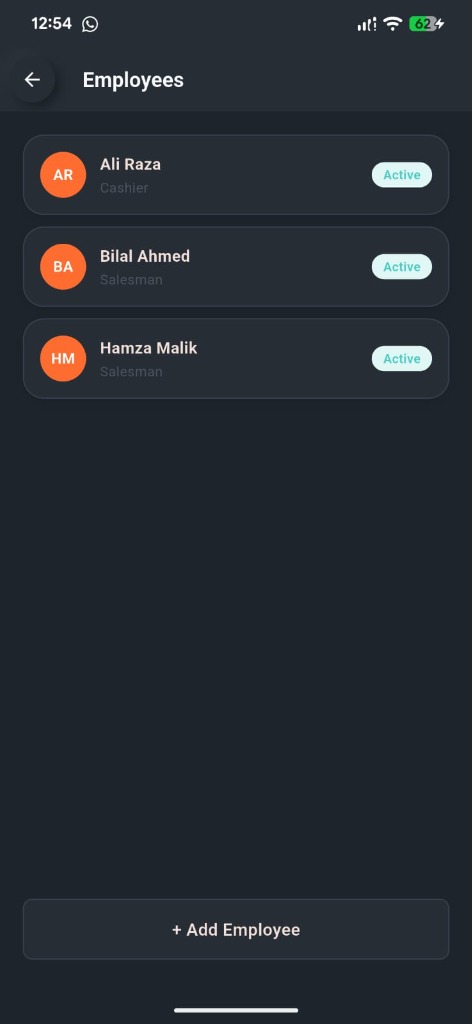
Staff & Employee Role Managementملازمین کی لسٹ اور عملے کے اختیارات
| Role / عہدہعہدہ | Mobile App Permissionsموبائل ایپ میں کیا کر سکتا ہے |
|---|---|
| Owner (مالک)مالک | Full access across all shops: views profits, reports, adds products, sets discounts, deletes entries.تمام دکانوں پر مکمل اختیار: منافع دیکھنا، رپورٹیں نکالنا، پروڈکٹ شامل کرنا، ڈسکاؤنٹ دینا۔ |
| Manager (مینیجر)مینیجر | Manages single branch: can bill, view stock, add expenses, give manager discounts.متعلقہ دکان کی سیل، سٹاک، اخراجات اور گاہک کھاتہ چلانا۔ |
| Salesman (سیلز بوائے)سیلز بوائے | Protected Mode: Can cut bills, add customers, take udhaar payments. CANNOT see purchase prices, net profit, reports, or give arbitrary discounts.محفوظ موڈ: صرف بل کاٹ سکتا ہے اور ادھار وصول کر سکتا ہے۔ قیمت خرید، اصل منافع اور رپورٹس نہیں دیکھ سکتا۔ |
13 Sales Pitch Guide — How to Sell the App to Shopkeepers سیلز گائیڈ — دکانداروں کو ایپ کیسے بیچیں اور قائل کریں
Use these proven sales scripts, benefit hooks, and objection answers when demonstrating PakkaHisaab to shopkeepers in mobile markets, commercial plazas, and retail bazars. موبائل مارکیٹوں اور بازاروں میں دکانداروں کو ڈیمو دیتے وقت ان آزمودہ دلائل اور جملوں کا استعمال کریں:
"Bhai jan, customer khata is 100% free forever. Just install it today, try adding 2 customers and speaking into the voice mic. You don't pay a single rupee to manage your udhaar." "بھائی جان! کسٹمر کھاتہ ہمیشہ کے لیے 100 فیصد مفت ہے۔ بس ابھی انسٹال کریں، 2 گاہک ڈالیں اور بول کر دیکھیں — ایک روپیہ بھی خرچ نہیں ہوگا اور کھاتہ کاغذوں سے ہمیشہ کے لیے نجات پا جائے گا۔"
"Show the shopkeeper how one tap on WhatsApp sends a polite reminder with exact balance. Explain: If this recovers even Rs 20,000 of stuck market udhaar this week, the app pays for itself 10 times over!" "دکاندار کو دکھائیں کہ واٹس ایپ بٹن دبانے سے کتنا شاندار اور مہذب میسج جاتا ہے۔ سمجھائیں کہ اگر ہفتے میں پھنسا ہوا 20 ہزار بھی نکل آیا تو ایپ کی قیمت پہلے دن ہی وصول ہو جاتی ہے!"
"A computer setup with screen, UPS, and barcode scanner costs Rs 60,000 to Rs 80,000. With PakkaHisaab, their existing phone does the exact same job with zero extra investment." "کمپیوٹر، یو پی ایس اور بارکوڈ گن پر 70 سے 80 ہزار لگ جاتے ہیں۔ پکا حساب میں یہی سارا کام دکاندار کے موجودہ موبائل فون سے بغیر کسی نئے خرچے کے ہوتا ہے۔"
Common Shopkeeper Objections & Answers:دکاندار کے اعتراضات اور ان کے جوابات:
| Customer Objectionگاہک کا سوال / اعتراض | Winning Answerتسلی بخش جواب |
|---|---|
| "What if my mobile phone is stolen or breaks?""اگر میرا موبائل چوری یا خراب ہو جائے؟" | Your account is securely linked with your registered phone number. Simply log into the app on any replacement device with your mobile number and password to access your shop.آپ کا اکاؤنٹ آپ کے تصدیق شدہ موبائل نمبر سے محفوظ ہے۔ نئے فون پر اپنا لاگ اِن نمبر اور پاسورڈ درج کر کے فوری اپنی دکان تک رسائی حاصل کریں۔ |
| "Does it work if electricity or internet goes out?""اگر بجلی یا انٹرنیٹ بند ہو جائے؟" | The mobile app runs on normal 4G mobile data and caches your product lists for fast billing even on weak connections.ایپ معمولی 4G موبائل ڈیٹا پر چلتی ہے اور کمزور سگنل پر بھی تیزی سے کام کرتی ہے۔ |
| "How much does the receipt printer cost?""پرنٹر کتنے کا آئے گا؟" | A compact 58mm Bluetooth pocket printer costs only around Rs 4,500 in Hafeez Centre / Hall Road and connects directly without wires.58 ایم ایم والا پورٹیبل بلیوٹوتھ پرنٹر مارکیٹ سے صرف 4,500 روپے کے قریب مل جاتا ہے اور بیٹری پر پورا دن چلتا ہے۔ |
14 Frequently Asked Questions (FAQ) عام پوچھے جانے والے سوالات
Is customer khata really free forever? کیا گاہک کھاتہ واقعی ہمیشہ کے لیے مفت ہے؟
Yes! You can add unlimited customers, record udhaar, log payments, speak into voice khata, and send WhatsApp reminder slips completely free with zero time limits. جی ہاں! آپ لامحدود گاہک شامل کر سکتے ہیں، ادھار اور وصولی درج کر سکتے ہیں، بول کر کھاتہ لکھ سکتے ہیں اور واٹس ایپ یاد دہانی بھیج سکتے ہیں — بالکل مفت، ہمیشہ کے لیے۔
When do I need the Business plan? بزنس پلان کب لینا پڑتا ہے؟
You only need a Business plan if you want Point-of-Sale (POS) counter billing, product inventory with barcode/IMEI tracking, profit/loss reports, and thermal receipt printing. بزنس پلان کی ضرورت صرف تب ہوتی ہے جب آپ کو کاؤنٹر سیل (POS)، کیمرے سے بارکوڈ/IMEI سکیننگ، منافع کی تفصیلی رپورٹ اور تھرمل رسید پرنٹنگ کرنی ہو۔
Can my salesman steal my profits or change prices? کیا سیلز مین قیمتیں بدل سکتا ہے یا منافع دیکھ سکتا ہے؟
No. In Salesman role mode, cost prices, net profit calculations, and manual discount overrides are locked and visible only to the shop owner. ہرگز نہیں۔ سیلز مین لاگ اِن میں قیمت خرید، منافع اور خود سے رعایت دینا بند ہوتا ہے اور یہ چیزیں صرف مالک کے فون پر نظر آتی ہیں۔
Which thermal printers are compatible with PakkaHisaab Mobile? کون سے پرنٹر پکا حساب کے ساتھ چلتے ہیں؟
Any standard Bluetooth ESC/POS thermal printer (58mm or 80mm), such as MTP-II, PT-210, POS-58, GOOJPRT, Xprinter, and Sunmi mobile devices. کوئی بھی معیاری بلیوٹوتھ ESC/POS پرنٹر (58 یا 80 ملی میٹر)، جیسے MTP-II, PT-210, POS-58, Xprinter اور سنمی پورٹیبل پرنٹرز۔
Need Support or Have Questions?رابطہ اور مدد:
Our customer success team is available on WhatsApp and phone to assist with setup, printer pairing, or staff training. ہماری سپورٹ ٹیم واٹس ایپ اور فون پر پرنٹر سیٹنگ اور عملے کی ٹریننگ کے لیے حاضر ہے۔